Donut Theory — User Manual
Donut Theory is a synthesis-based instrument by kim for Akai MPC standalone. It combines warm basses, worn keys, analog-style leads, textured pads and playable chord progressions in one instrument. Its character draws on soul and hip-hop production; it is not an official artist product or an exact recreation of a particular record, keyboard or tape machine.
This manual describes the current instrument layout. Check the release notes for the installation package’s exact version, tested hardware and remaining limitations. The development reference device is MPC Live III running MPC OS 3.10.1.12. This does not establish compatibility or performance on every MPC model. Multiple simultaneous screen touches, every physical Q-Link and worst-case CPU use require their own device checks.
Contents
- Install, update and remove
- First session
- Navigation and selection
- MAIN and Q-Link controls
- Sounds and presets
- Keyboard, physical pads and screen chords
- Chord editor
- Synthesis reference
- Saving, recording and automation
- Troubleshooting
- Manual pad location hints
- Factory sound list
- What changed in 1.2.0
- Earlier changes in 1.1.2
Install, update and remove
Requirements
- MPC standalone with MPC OS 3.10.1 or later and support for external plugins.
- In Preferences → Enhancements (Beta), enable Enable Enhancements and External Plugin Support. Wording may vary with the MPC OS version.
- A drive accessible to the MPC with a
VST2 Pluginsdirectory.
The package includes ARM32 and ARM64 MPC binaries. The native development library is a test build, not a desktop instrument installer. This package does not establish support for a desktop DAW.
Install
- Download the Donut Theory MPC ZIP from its specific release, then extract it.
- Locate the complete folder named
kim - VST - Donut Theory. - Copy that folder into
VST2 Pluginson your MPC-accessible drive. Keep the contents and subfolders together. - Restart the MPC application or device so it can discover the plugin.
- Create an instrument/plugin track and select Donut Theory from the external plugins.
The directory should look like this:
VST2 Plugins/
└── kim - VST - Donut Theory/
    ├── plugin.json
    ├── version.xml
    ├── VST/
    │   ├── donut-theory-arm32.so
    │   └── donut-theory-arm64.so
    ├── Plugin Skins/
    └── Content/
Avoid an extra nested copy of kim - VST - Donut Theory inside itself. Do not copy only the .so file: the skin and manifest are required. Normal installation does not require developer mode or SSH.
Update
Save and back up your MPC project first. Keep the previous package if you need to return to it. The 1.2.0 engine changes the sound of saved projects even when their controls are unchanged. Render tracks before updating if you need exact old sound. Replace the existing plugin folder with the new complete folder, then restart MPC. Avoid duplicate installations on different drives.
Donut Theory retains its plugin identity across updates. Existing projects may retain host-side Q-Link assignments from an older instance. If a mapping looks wrong, compare a fresh plugin instance before changing the original track. Preserving the plugin identity does not guarantee that an older MPC OS can load a project saved by a newer OS.
Remove
Save a copy of any project that uses the plugin, and render or replace its tracks if needed. Remove kim - VST - Donut Theory from VST2 Plugins, then restart MPC. Projects that reference it will require the plugin to restore those instrument tracks.
First session
- Open Donut Theory. The plugin starts on MAIN, without a startup tutorial popup.
- Tap SOUND PRESET, choose a category, then choose a sound. Try a Lead or Pad for an analog-style starting point.
- Set INPUT to NOTES to play ordinary notes from pads or a keyboard.
- Adjust Filter Cutoff, Body and Drift. Use Attack and Release to change how the sound starts and ends.
- Press and hold a large chord pad at the bottom of MAIN. Release it to end the gate; the Amp Release and effects determine the remaining tail.
- To play those chords from physical MPC pads, open CHORD, use LEARN for each slot, and choose CHORDS or SPLIT input mode.
Start at a comfortable listening level. Sound Trim helps balance the factory bank, but velocity, note range, resonance, overlapping chords and drive can still change perceived loudness.
Navigation and selection
The lower MPC function-key area provides MAIN, OSC, FILTER, AMP, MOD and FX. The first key has two views: pressing it while MAIN is visible opens the single CHORD editor; pressing it again returns to MAIN. Choose the chord bank inside the editor rather than repeatedly pressing MAIN to cycle banks.
The gray MPC track/plugin/preset bar belongs to the host. The controls within the illustrated Donut Theory panel belong to the plugin.
Selection lists
Tap a plugin selection field to open a list in the left sidebar, while retaining the current page behind it. Choose an item to apply it and close the list. Longer lists provide page controls. Use X or tap outside the sidebar to close it without making another selection. Continuous controls can be dragged; value fields may also provide double-tap editing where shown.
SOUND PRESET uses category-first browsing: choose Init, Bass, Keys, Synth, Lead or Pad, then a sound. Use the browser’s back control to choose another category. Reopening SOUND PRESET starts from the category list.
The gray MPC PRESET selector is different. With the current host/SDK integration it exposes a flat list of 64 programs, with category prefixes such as Bass / Pocket Anchor. These prefixes are names, not host folder navigation. Use the plugin’s SOUND PRESET control for category-first selection.
MAIN and Q-Link controls
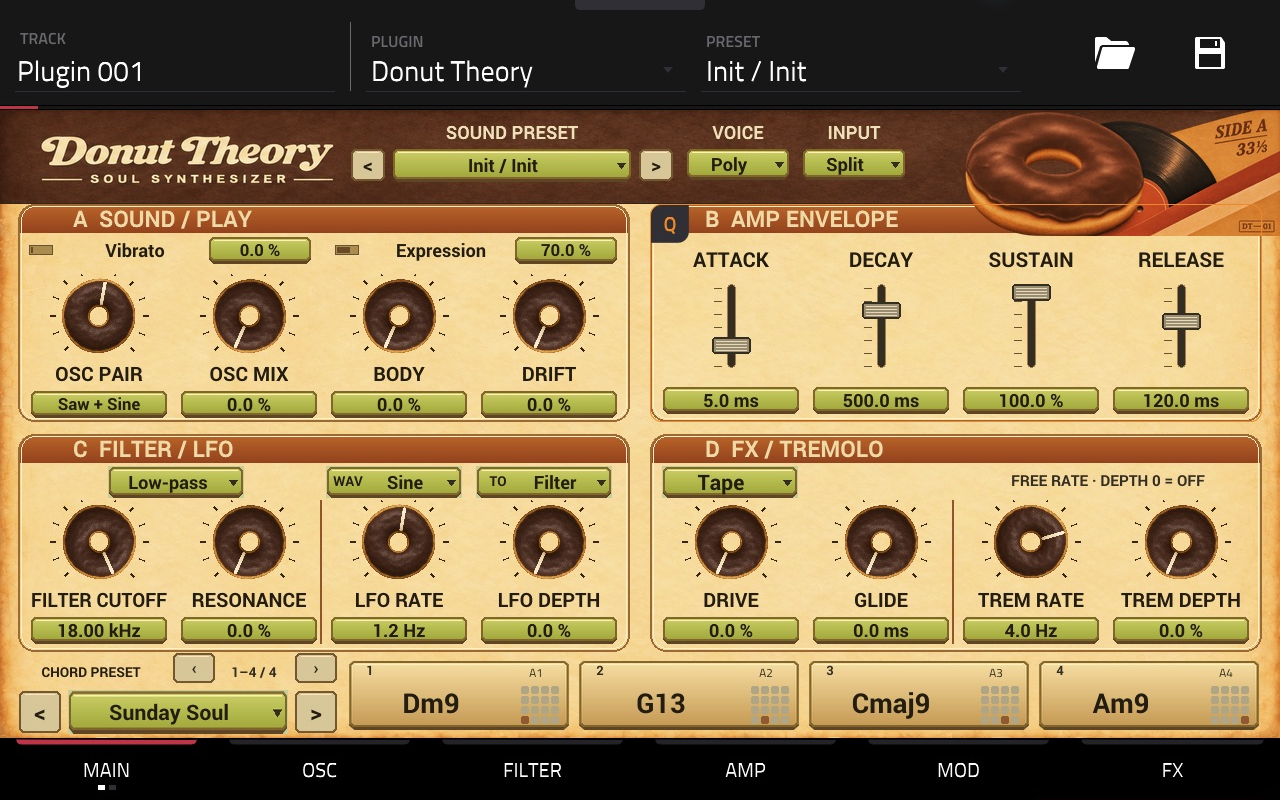
MAIN arranges four groups in reading order: A upper left, B upper right, C lower left and D lower right. Each group has four Q-Link controls.
| Group | Control 1 | Control 2 | Control 3 | Control 4 |
|---|---|---|---|---|
| A · SOUND / PLAY | OSC Pair | OSC Mix | Body | Drift |
| B · AMP ENVELOPE | Attack | Decay | Sustain | Release |
| C · FILTER / LFO | Filter Cutoff | Resonance | LFO Rate | LFO Depth |
| D · FX / TREMOLO | Drive | Glide | Tremolo Rate | Tremolo Depth |
With the supplied column mapping, the four physical controls read top to bottom in the same order as each group reads left to right. The host’s 16-control positions are A = 13/9/5/1, B = 14/10/6/2, C = 15/11/7/3 and D = 16/12/8/4.
Q-LINK SCREEN follows the current plugin view. On CHORD it becomes the chord editor mapping described below. Program/Track mappings retain the synth controls; they do not become chord editing controls simply because the editor is visible.
OSC Mix is immediately beside OSC Pair on MAIN. Glide is in group D and also available on AMP. Space remains on FX. Body retains its existing influence on oscillator balance and sub level; the Osc Mix value is the base balance before this shaping.
The filter type, LFO Shape/Target and drive type have touch selectors near their controls. Drive type sits above Drive. Vibrato and Expression remain available as separate touch controls; they do not occupy the main 16 Q-Link positions.
What to reach for
| Desired change | Control |
|---|---|
| Different oscillator character | OSC Pair |
| Fuller low body | Body |
| Slowly wandering, tape-like pitch | Drift |
| Static beating between oscillators | Detune on OSC |
| Sliding between notes | Glide and Glide Mode |
| Softer or brighter tone | Filter Cutoff, then Resonance |
| Short pluck or long pad | Amp ADSR |
| Periodic filter movement | LFO Target = Filter, Rate and Depth |
| Volume pulsation independent of filter movement | Tremolo Rate and Depth |
| Saturation or distortion | Drive Type, Drive and Drive Mix |
| More width and echoes | Space; refine Chorus and Delay on FX |
Sounds and presets
Factory sounds
Version 1.2.0 uses a Moog-inspired synthesis engine, not just revised preset recipes. The default low-pass path combines nonlinear oscillator mixing, a four-stage nonlinear ladder and rounded VCA response. All 63 playable factory sounds have been refitted for its cutoff, resonance and envelope behavior, and output trims are remeasured. No additional mode needs to be enabled. It is an inspired hybrid engine rather than a component-accurate recreation of a named Moog instrument. Existing parameter values load, but existing project sounds change through the new engine. Keep 1.1.2 and render tracks before upgrading when exact old sound is needed.
There are 64 factory sounds: Init 1, Bass 12, Keys 15, Synth 12, Lead 12 and Pad 12. They use the same synthesis engine rather than acoustic instrument samples. Keys such as tines, bells and reeds describe their synthesized character.
Init is a simple starting sound with Low-cut and effects off. The other sounds include individual Low-cut and Sound Trim settings. Low-cut removes unwanted bass; it is separate from the main creative filter. These settings are starting points for a mix, not a guarantee that every arrangement needs the same EQ.
Selecting a sound changes the timbre, envelopes, modulation, effects, Low-cut and Sound Trim, and clears currently sounding notes. It preserves the master Volume, input mode, chord slot count/page, chord settings, chord presets and pad assignments. You can audition different sounds without rebuilding the progression.
The SOUND PRESET arrows browse sounds. They are independent of the CHORD PRESET arrows at the bottom.
Chord progression recipes
There are 32 four-chord recipes: eight base progressions in four transpositions, at 0, +2, −2 and +5 semitones. They are not 32 distinct sixteen-chord songs.
| Base recipe | Four chords at its base transposition |
|---|---|
| Sunday Soul | Dm9 → G13 → Cmaj9 → Am9 |
| Basement Loop | Fm9 → Bbm9 → Eb9 → Abmaj7 |
| After Hours | Dm9 → Gm9 → A7♭9 → Dm9 |
| Velvet Morning | Ebmaj9 → Cm9 → Fm9 → Bb13 |
| Dusty Sunset | Am9 → Fmaj9 → Dm9 → E7♭9 |
| Warm Windows | Gmaj9 → Em9 → Am9 → D13 |
| Open Sky | Csus2 → Fmaj9 → Asus2 → Gsus2 |
| Soul Turnaround | Cmaj9 → A7 → Dm9 → G9 |
CHORD PRESET affects only the four slots currently visible on MAIN. It replaces their Root and Type. It preserves their Voicing, Octave and Pad Note assignments, and leaves the other twelve slots untouched. Each of the four banks remembers its own preset selection.
For example, with 16 slots active and bank 9–12 visible, choosing Sunday Soul changes slots 9–12 only. Slots 1–8 and 13–16 retain their chords. The MOD page’s PRESET 1–4 control is explicitly for the first bank; it does not follow the visible bank.
Keyboard, physical pads and screen chords
Input mode versus voice mode
These are separate settings.
| Input mode | Incoming MIDI behavior |
|---|---|
| NOTES | Every incoming note plays an ordinary melodic note. |
| CHORDS | Mapped notes trigger active chord slots; other notes are ignored. |
| SPLIT | Mapped notes trigger chords; other notes play ordinary melody. |
SPLIT is based on assigned notes, not a universal keyboard split point. Chords and melody use the same sound; this is not a multitimbral instrument.
Mono, Legato and Poly govern ordinary melody in both NOTES and SPLIT. Mono/Legato are single-note modes with last-note fallback. Legato carries the envelope through genuinely overlapping notes; separated notes retrigger it. The Glide Mode setting controls whether slides occur always or only with overlapping notes.
Chord expansion remains polyphonic regardless of melodic Voice Mode. In Mono/Legato, one voice is reserved for ordinary melody so a chord does not take over the melodic voice.
Hold-to-play screen pads
Press a MAIN chord pad to play it and release to end its gate. This works in every Input mode. Release is musical: a long Amp Release, chorus or delay can continue after your finger leaves the screen. It is not a latching switch.
Changing the visible bank releases screen-held chords that leave the page. It does not release physical MIDI chords merely because their bank is no longer visible.
Screen pads audition the internal synth directly. They do not send MIDI notes into the MPC sequencer. To record a performance as MIDI, use physical pads or a MIDI keyboard with the appropriate input routing.
Connect physical pads with LEARN
The plugin receives MIDI note numbers, not labels such as A1. MPC Pad Perform scales, octave settings and note layouts can change the notes sent by the same physical pad. You do not need to alter MPC’s layout to match Donut Theory.
- Press the first function key from MAIN to open CHORD.
- Select the desired four-slot bank. Add slots first if needed.
- Tap LEARN for the target slot.
- Press the physical pad or keyboard key you want to use.
- The first note is consumed silently for registration. Confirm the displayed MIDI number, completion status and LEARN disengagement.
- Press the same pad again to play its chord. Use CHORDS or SPLIT input mode. Learning while in NOTES changes the mode to SPLIT.
Use CANCEL LEARN to exit without assigning a note. Learning an already assigned note swaps slot assignments to retain unique mappings. A slot’s MIDI Note display also supports double-tap manual assignment. MIDI Note is intentionally outside the chord Q-Link controls.
The first four default mappings are 24, 26, 28 and 29. The complete sixteen-slot defaults are 24, 26, 28, 29, 31, 33, 35, 36, 38, 40, 41, 43, 45, 47, 48 and 50. Only active slots respond. Use MIDI numbers as the reference: software can label the same number with different octave names.
In CHORD → ADVANCED, Individual pad mapping uses each slot’s assignment and is the recommended mode. Consecutive / Trigger Base retains older projects’ consecutive-note routing. Ensure its range does not exceed MIDI note 127 when using many slots.
Sustain and controllers
- CC64 sustains MIDI notes/chords until the pedal is released.
- CC1 adds pitch vibrato.
- Pitch bend follows the Bend Range setting.
- MIDI All Notes Off / All Sound Off and controller reset are handled by the engine.
- CHORD → ADVANCED → ALL NOTES OFF clears screen, keyboard and physical-pad notes, sustain and effect tails. Use it to recover from an interrupted input stream.
Chord editor
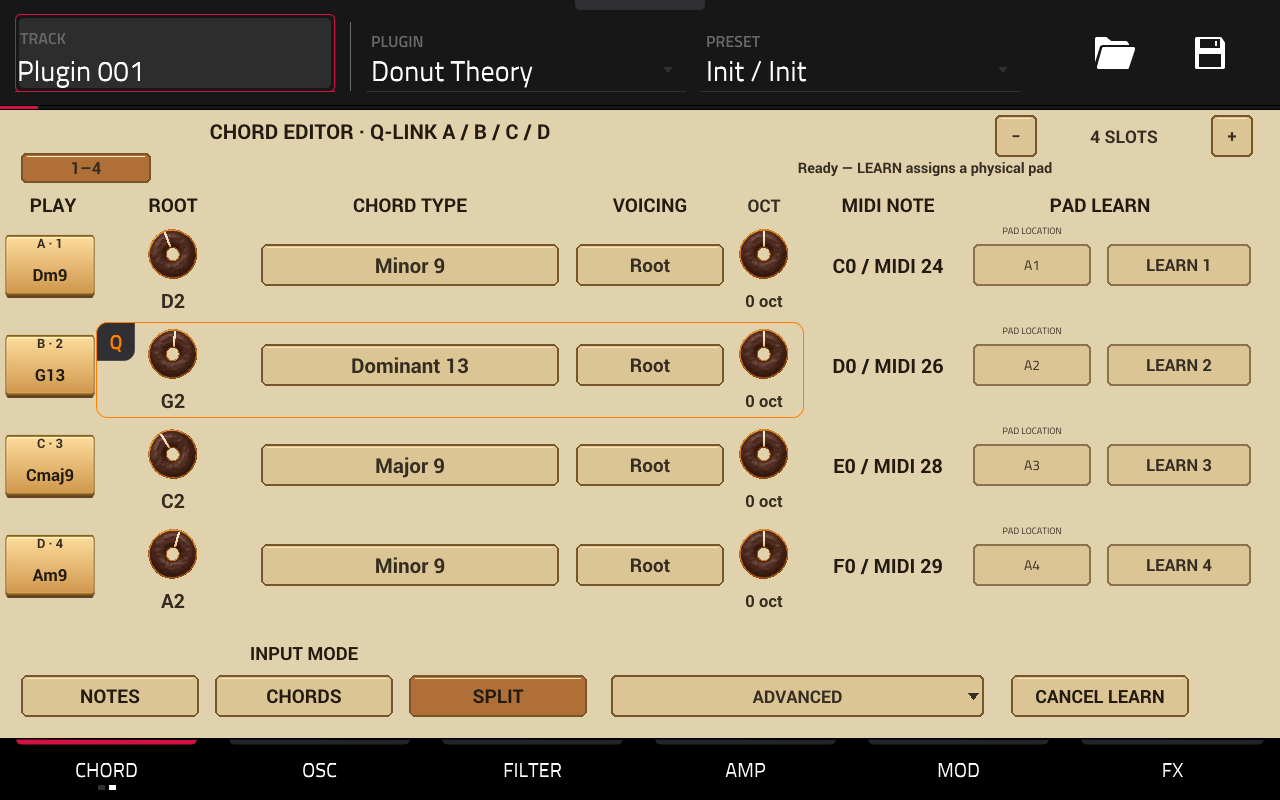
Four to sixteen slots
New instances start with four active slots. The editor’s + / − changes the active count in groups of four: 4, 8, 12 or 16. Reducing the count retains the inactive slots’ settings for later reactivation. Changing the active count clears sounding notes.
Use the in-screen 1–4 / 5–8 / 9–12 / 13–16 bank buttons to edit the available banks. MAIN shares this selection and always shows four large pads. Its page arrows change banks; its CHORD PRESET arrows change the recipe for the visible bank. Version 1.1.2 gives both arrow pairs 44×44 touch targets while retaining the four large chord pads. Physical note mappings continue to address their slots independently of the visible bank.
Q-Link editing
In Q-LINK SCREEN, groups A–D represent the four visible slots. Each group has:
| Q-Link | Setting |
|---|---|
| 1 | Root |
| 2 | Type |
| 3 | Voicing |
| 4 | Octave |
For bank 5–8, A edits slot 5, B slot 6, C slot 7 and D slot 8. MIDI Note stays a separate assignment field. Octave is available as a donut control and a value selection list.
Root, type, voicing and octave
Root sets the chord’s root note and register, over MIDI notes 24–84. Octave shifts the whole resulting voicing by −2 to +2 octaves without changing the trigger assignment. This lets you keep a comfortable pad layout while placing chords in a useful register.
| Type | Intervals above the root, in semitones | Tones |
|---|---|---|
| Minor 7 | 0, 3, 7, 10 | 4 |
| Major 7 | 0, 4, 7, 11 | 4 |
| Minor 9 | 0, 3, 7, 10, 14 | 5 |
| Major 9 | 0, 4, 7, 11, 14 | 5 |
| Dominant 7 | 0, 4, 7, 10 | 4 |
| Dominant 9 | 0, 4, 7, 10, 14 | 5 |
| Dominant 13 | 0, 4, 10, 14, 21 | 5 |
| Sus 2 | 0, 2, 7 | 3 |
| Minor | 0, 3, 7 | 3 |
| Major | 0, 4, 7 | 3 |
| 7 flat 9 | 0, 4, 7, 10, 13 | 5 |
Dominant 13 intentionally omits the fifth. It is a five-note voicing rather than a seven-note stack.
Voicing offers Root, available inversions and Open. Triads provide 1st and 2nd inversions; four-note chords add 3rd; five-note chords add 4th. An inversion moves a chord member into the bass. Open raises alternating members by an octave. Changing to a shorter chord clamps an unavailable inversion to its last valid position.
Spread, on the detailed controls, introduces 0–40 ms between chord tones, from low to high. It is a strum-like onset spread, not stereo width.
Editing a screen-held chord refreshes its voicing. A chord already held through MIDI retains its current notes until the next trigger. This avoids changing a recorded or pedal-held MIDI chord halfway through its gate.
Slots are not voices
The engine has 16 audio voices, not sixteen complete chords of unlimited size. A chord consumes three to five voices. Several overlapping chords, long releases or sustained notes can exhaust the pool and cause voice stealing. In Mono/Legato, the melody reservation leaves fifteen voices for chords. Reduce overlap or release time if earlier chords disappear.
Synthesis reference
OSC
| Control | Function |
|---|---|
| Oscillator 1 / 2 Wave | Sine, Triangle, Saw or Pulse. |
| OSC Pair | Selects one of sixteen two-waveform combinations; does not replace Mix, Detune, filter or envelope settings. |
| Osc Mix | Balance of the two oscillators, 0–100%. |
| Detune | Static oscillator-2 offset, −25 to +25 cents. |
| Oscillator 2 Octave | −2 to +2 octaves. |
| Pulse Width | Pulse duty cycle, 5–95%. |
| Sub | Sine sub-oscillator amount, 0–100%. |
| Noise | Noise amount, 0–30%. |
| FM | Phase-modulation character on Sine oscillator 1, 0–100%; not a general multi-operator FM matrix. |
| Tone | Harmonic/saturation character macro; separate from the stored base cutoff. |
| Body | Thickness through oscillator balance and sub contribution. |
| Drift | Shared slow wow and faster flutter-like pitch movement. |
Drift is not Detune. Detune creates a steady offset between oscillators. Drift moves pitch over time for worn-tape instability, with a fine low-end taper for subtle settings. Vibrato is another distinct effect: regular periodic pitch movement. Motion, on MOD, adds its own slow movement and chorus contribution.
FILTER
Low-pass uses a four-stage nonlinear ladder with a 24 dB/octave asymptotic slope. Its input and resonant stages respond to level; higher resonance naturally reduces low-frequency gain. The loop gain is limited below autonomous self-oscillation. The displayed cutoff sets the pole frequency: at zero resonance the four-stage response is approximately −12 dB there, rather than a calibrated −3 dB point. The ladder runs at 2× internal rate with output filtering to reduce nonlinear aliasing.
Band-pass, High-pass and Notch retain the existing 12 dB/octave SVF implementation as extensions. They are not ladder variants. The oscillator summer and VCA also add gentle nonlinear coloration with external Drive off. Oscillator wave generation remains band-limited PolyBLEP/wavetable synthesis; phase continues between retriggers. This is not a complete analog oscillator circuit simulation.
| Control | Range / purpose |
|---|---|
| Filter Cutoff | 20 Hz–18 kHz; center frequency in modes where appropriate. |
| Resonance | 0–100%; emphasizes the cutoff region. |
| Filter Env | −100 to +100%; negative closes, positive opens relative to the base setting. |
| Filter Attack / Decay / Release | 1–5000 ms each. |
| Filter Sustain | 0–100%. |
| Key Track | 0–100%; higher notes raise the filter’s operating frequency. |
Filter ADSR shapes brightness and is separate from Amp ADSR. Velocity-dependent Expression can also affect brightness. The Low-cut on FX is a final bass-cleanup filter; it does not replace this filter or follow its LFO/envelope.
AMP and play settings
| Control | Range / purpose |
|---|---|
| Amp Attack | 1–5000 ms from note-on to full level. |
| Amp Decay | 1–5000 ms from peak to sustain. |
| Amp Sustain | 0–100% level while held. |
| Amp Release | 1–5000 ms after the gate ends. |
| Volume | Master level, −60 to 0 dB; retained across sound selection. |
| Expression | 0–100% velocity response in level and brightness. |
| Voice Mode | Mono, Legato or Poly for ordinary melody. |
| Glide | 0–500 ms; zero disables the slide. |
| Glide Mode | Always or Legato Only. |
| Bend Range | 0–24 semitones. |
| Input Mode | Notes, Chords or Split. |
| Trigger Base | Legacy consecutive chord-trigger range. |
| Spread | 0–40 ms between chord tones. |
| Chord Slot | Selected/edited slot indication; not a MIDI trigger assignment. |
A short release still has a short envelope tail. A pad’s long release can sound sustained after a screen pad is released; lower Release to distinguish this from a stuck gate.
MOD: LFO, vibrato and movement
The main LFO offers Sine, Triangle, Square and Sample & Hold, with target Pitch, Filter, Pulse Width or Amp. Shape and Target are touch choices on MAIN. Sync and Division are on MOD. There is no separate duplicate LFO Settings page.
- Rate: 0.05–20 Hz when Sync is off.
- Depth: 0–100%.
- Sync: follows MPC tempo when enabled.
- Division: 1/16, 1/8, 1/4, 1/2 or 1 bar when synchronized.
With Sync on, Division and host tempo determine the effective speed. The free-running Hz value is retained, but turning that value does not set the synchronized speed. Change Division for a different rhythmic rate.
Vibrato has a dedicated 5.2 Hz pitch oscillator, with depth control and additional CC1 response. Motion combines slow pitch movement with chorus contribution. These can coexist with Drift and the main LFO; moderate their combined amount for stable tuning.
MOD’s PRESET 1–4 selects the first bank’s chord recipe only, even while another bank is visible on MAIN.
FX: saturation, space and cleanup
| Control | Function |
|---|---|
| Drive Type | Tape, Tube or Fuzz waveshaping character. These are not exact circuit models. |
| Drive | Distortion intensity, 0–100%. |
| Drive Mix | Dry/wet balance, 0–100%. |
| Chorus | Chorus amount, 0–100%. |
| Delay | Delay mix, 0–100%. |
| Feedback | Echo regeneration, 0–65%. |
| Delay Division | Tempo-related 1/8, 1/4, dotted 1/4 or 1/2. |
| Space | Combined chorus/width and delay-wet macro, 0–100%. |
| Tremolo Rate | Independent volume modulation, 0.1–15 Hz. |
| Tremolo Depth | 0–100%; zero disables the pulsation. |
| Low-cut | Final low-frequency cleanup, Off to 250 Hz. |
| Sound Trim | Per-sound output correction, −18 to +18 dB. |
Tremolo is independent of the main LFO, so filter movement and volume pulsation can run together. Tremolo is free-running in Hz; it has no tempo-sync division. It follows Drive and precedes chorus/delay, so echoes may continue between its pulses.
Low-cut acts on the stereo output after chorus/delay. Typical factory starting ranges are 18–28 Hz for Bass, 85–160 Hz for Keys, 85–140 Hz for Synth, 100–160 Hz for Lead and 120–200 Hz for Pad. Adjust to the arrangement. Raising Low-cut too far can remove a bass patch’s fundamental.
Sound Trim balances a patch’s output; Volume is your overall listening/track level. The factory trim measurements use a standardized performance and cannot predict every combination of notes and effects.
FX recipes
The FX selector offers Custom, Dry, Warm Tape, Wide Chorus, Slap Delay, Space Echo, Fuzz Box and Dark Dub. A recipe sets Drive Type, Drive, Drive Mix, Chorus, Delay, Feedback, Delay Division and Space. Dry also zeros Motion, Tremolo Depth and Drift.
Custom leaves the existing controls unchanged. After editing a recipe’s controls, its displayed name describes the last selection, not a verified exact match. To reapply the same recipe, select Custom and then select the recipe again. Loading another sound loads that sound’s effects settings.
Saving, recording and automation
Save the MPC project to retain the instrument’s settings. Chord content, voicings, octave shifts, pad assignments, active count, selected bank and bank-specific preset choices are part of plugin state. Screen-held notes and pending commands are temporary, not saved performance data.
Saving ends active screen audition gates on the next audio processing block. It does not discard held physical MIDI ownership. Reloading a project never intentionally starts a chord just because it was being touched during the save.
Use physical pads or MIDI keys to record chord-trigger notes into a sequence. The plugin expands those triggers internally; it does not output the expanded chord as recorded MIDI. Keep the corresponding slot and input settings with the project so playback expands the same triggers.
For automation, use the actual synth or per-slot chord parameters exposed by MPC. The sixteen bank-following CHORD Q-Link editing controls are non-automatable editing proxies: recording them as though they permanently represented slots 1–4 would be ambiguous after changing banks. Each actual slot retains its own automation target.
Selecting a different sound or changing input/voice routing clears current notes. Changing the visible chord bank releases screen audition gates but preserves physical MIDI-held chords. When changing several settings during a performance, release notes first if you want a predictable transition.
Troubleshooting
| Symptom | Check |
|---|---|
| Plugin does not appear | OS requirement, Enhancements and External Plugin Support; complete package under VST2 Plugins; no extra nested folder; restart MPC. |
| Background or knobs are missing | Replace the complete package, including Plugin Skins; a binary-only installation is incomplete. |
| Presets appear in one long list | The gray host PRESET list is flat. Use the illustrated panel’s SOUND PRESET for category-first browsing. |
| Physical pads play single notes | Select CHORDS/SPLIT and LEARN each desired pad; NOTES intentionally bypasses chord expansion. |
| A physical pad is silent | Confirm track/input routing, active slot count and the actual learned MIDI number; in CHORDS unmapped notes are ignored. |
| First learned pad press is silent | Expected: the first event registers its note. Press again to play. |
| Screen chords do not record into the sequence | Screen pads are internal audition gates. Record physical-pad or keyboard triggers. |
| Sound continues after releasing a pad | Check Amp Release, delay and CC64 sustain. Use ALL NOTES OFF if an input was interrupted. |
| Legato still produces a full chord | Legato governs ordinary melody; chord triggers intentionally remain polyphonic. |
| Some held chords disappear | The sixteen-voice limit is shared by notes and chord tones. Reduce overlap, sustain or release. |
| LFO Rate seems ineffective | With Sync on, change Division; free Hz is retained but does not set synchronized speed. |
| Chords change in the wrong bank | MAIN CHORD PRESET follows its visible bank; MOD PRESET 1–4 always addresses the first bank. |
| Q-Link still changes synth controls in CHORD | Select Q-LINK SCREEN. Program/Track retain the synth map. |
| An old project has an old Q-Link layout | Preserve the project and compare a fresh instance; host-side assignments can be stored independently of the current skin. |
| Pitch sounds too unstable | Reduce Drift, Motion, Vibrato/CC1 and Pitch-target LFO depth; Detune is a separate static offset. |
| Sound is thin after editing | Check Low-cut, main filter mode/cutoff, OSC Mix and Body. |
When reporting an issue, include the package version, MPC model/OS, input mode, voice mode, sound name, active chord bank, Q-Link mode and whether it occurs in a new instance or an older project. A screenshot and a short reproducible sequence are more useful than an isolated symptom.
Manual pad location hints
PAD LOCATION in the shared CHORD editor lets you choose a bank (A–H) and a cell in a 4×4 grid. Pad 1 is bottom-left; pad 16 is top-right. Then use that slot’s LEARN button and press the physical pad to register its MIDI note. The first registration press is silent. MAIN shows your chosen location beside the chord name; unassigned locations remain hidden. CLEAR LOCATION removes the hint without changing MIDI routing. The location is a manual reminder, not an automatically detected hardware position. If you change MPC pad layouts, verify the hint and repeat LEARN as needed. Project saving preserves all sixteen hints; sound/progression presets do not replace them. This feature is included in version 1.1.2. Location hints are saved with the project and are excluded from Q-Link and automation assignments.
Factory sound list
| Category | Sounds |
|---|---|
| Init · 1 | Init |
| Bass · 12 | Pocket Anchor; Maple Thump; Brick Bounce; Molasses; Crate Knock; Soft Cone; Motor Hum; Felt Punch; Honey Slide; Walnut Pluck; Low Canvas; Dust Motor |
| Keys · 15 | Felt Circuit; Worn Tines; Honey Reeds; Kitchen Bell; Soft Hammer; Velour Clav; Milk Glass; Tape Celeste; Reed Cabinet; Bronze Mallet; Evening Felt; Pocket Organ; Pearl Hammer; Cocoa Tines; Dust Harp |
| Synth · 12 | Chopped Brass; Mellow Block; Velvet Stab; Amber Stack; Rubber Chord; Hollow Print; Record Bloom; Copper Pluck; Faded Poly; Small Ensemble; Syncopated Ink; Glass Chord |
| Lead · 12 | Ribbon Whistle; Bent Wire; Narrow Alley; Honey Horn; Syrup Line; Ink Flute; Frayed Saw; Pocket Squeak; Golden Thread; Melted Neon; Muted Trumpet; Round Needle |
| Pad · 12 | Draped Velvet; Paper Halo; Warm Projection; Woven Air; Satin Room; Faded Choir; Ember Strings; Curtain Light; Soft Horizon; Opaque Silk; Dusk Film; Golden Haze |
For exact release compatibility and completed validation, consult the download’s release notes. The repository also maintains preset design notes and the implementation and verification record.
Earlier changes in 1.1.2
- Default sound: all 63 playable factory sounds have Moog-inspired voicing: revised oscillator blends, low-pass settings, envelopes, restrained detune and Tape saturation. Effects and pitch movement are reduced where appropriate. This is recipe retuning within the existing synthesis engine, not a new ladder-filter model.
- Level and low end: stereo renders were used to recalibrate Sound Trim. Individual low-cut settings remain; dry Init is unchanged. Velocity, register, resonance, drive and overlapping chords still affect output level.
- Chord navigation: chord-preset and slot-page arrows have 44 × 44 touch targets. Four large 222 × 70 chord pads remain. Repeated HOLD TO PLAY captions are removed, with chord names and optional location hints sharing the pad face.
- Physical-position hints: the shared CHORD editor has a manual A–H / 1–16 location drawer. MAIN shows the assigned label and 4 × 4 highlight. Clear removes the hint without changing MIDI. Register the actual input with LEARN.
- Compatibility: previous parameter IDs/order and Q-Link mappings are preserved; sixteen nonautomatable position parameters are appended. Existing project sounds retain their saved settings. Select a factory sound to hear its revised recipe. Old projects load with unassigned hints.
Builds for native, ARM32 and ARM64, SDK validation, host simulator 19 checks, engine/UBSan/VST bridge and skin regressions pass. All 64 sounds have finite, non-silent offline renders within the measured test bounds. On MPC Live III / OS 3.10.1.12, the new location selection/clear/MAIN display and Q-Link guide hide/restore were checked through Remote Screen Viewer. A complete hardware listening review of all revoiced sounds, fresh physical LEARN inputs, all physical Q-Link rotations, simultaneous finger multi-touch and a new hardware project save/restart round-trip were not completed for this update. Automated state migration and note ownership tests pass.
What changed in 1.2.0
- Engine: new nonlinear oscillator summer, four-stage nonlinear ladder Low-pass, simultaneous resonant feedback solve, 2× ladder processing with FIR output filtering, and rounded VCA response. No new UI or engine mode. The other filter types and downstream FX are retained.
- Factory bank: all 63 playable sounds have new cutoff/resonance/envelope operating points and gentler external drive. Stereo renders recalibrate Sound Trim; names, categories, Low-cut and Init parameter recipe remain. Intrinsic engine coloration applies to Init too.
- Compatibility: UID and all 208 parameter declarations/order/ranges, UI and Q-Link maps remain. Saved parameters restore but do not produce identical old sound. Use1.1.2 for exact old-engine recall.
- Performance: the ladder costs more CPU. A desktop16-voice benchmark measured about 5.8% average / 10.5% worst block in the recorded run; this does not predict MPC headroom. Overlapping long-release chords are the most demanding case.
- Evidence: dedicated filter response/nonlinearity/modulation/rate tests, engine/UBSan/bridge, host simulator19 and skin checks pass. All 64 sounds render finite/non-silent offline. Same-state A/B audio isolates engine changes from preset changes. Hardware verification and remaining limits are documented in the release notes.
Engine design and research references
For this release, the 1.2.0 files were transferred to the MPC with size verification, but application restart is pending approval to discard or preserve the current unsaved project. The new engine has not been run on the device. Hardware audio/CPU and fresh project round-trip checks remain unverified; the screenshots document the unchanged 1.1.2 layout.